
Beacon Game Launcher
NERDS TAKE OVERPersonalization
4.3170.00 Reviews
- Version
- 1.9.0
- Installs
- 10.00K
- Age Rating
- Everyone
Screenshots
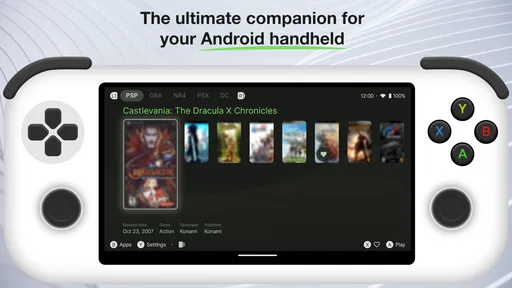
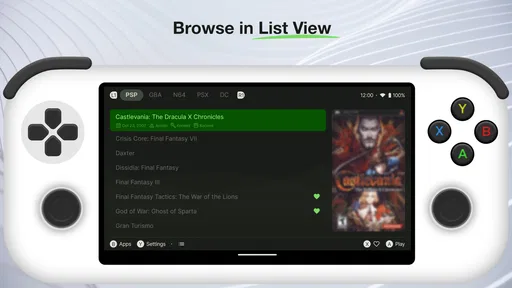
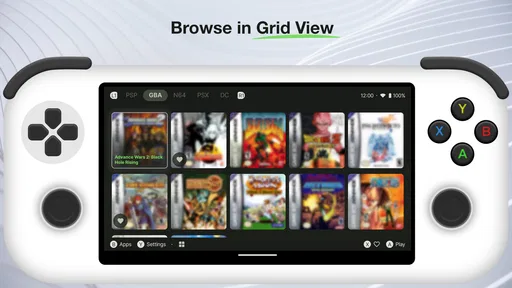
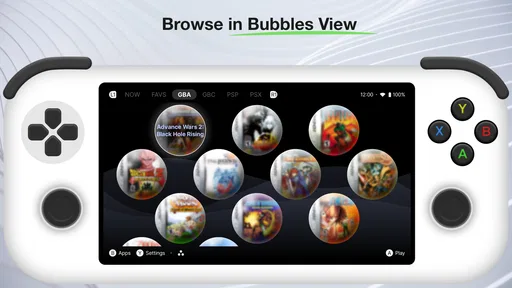
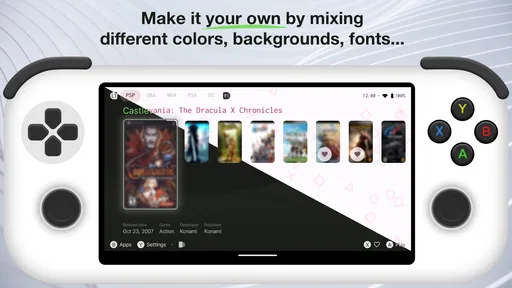
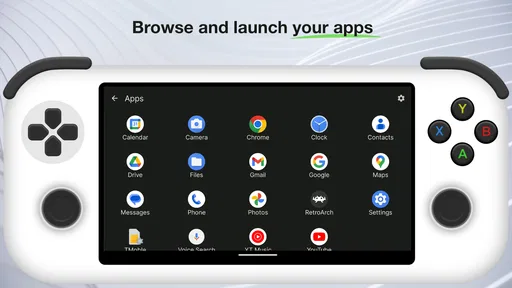
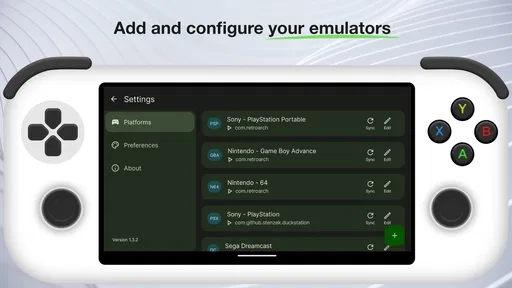
Our Review of Beacon Game Launcher
 Analysis by Appyee
I see Beacon Game Launcher as a focused personalization app for people who want their phone to feel less like a general-purpose device and more like a place to start gaming. That idea is appealing, but it also sets a specific expectation: Beacon is most useful if you want a game-oriented home experience, not if you are simply looking for another way to browse or download titles. I’d consider it when a regular home screen feels cluttered or too detached from the games I actually play.
A game-first home screen, not a new game store
The important distinction is that a launcher changes how you get around your device; it does not automatically replace the services where games are found, installed, or managed. I would treat Beacon as a way to bring a gaming feel to everyday navigation rather than as a universal library that can take over every part of playing. That makes the app’s appeal easier to judge: it is for someone who enjoys personalizing the route into games, not someone expecting a single app to solve every gaming-related task.
That distinction also helps answer a practical question: should you use it alongside your existing setup or instead of it? I’d keep the familiar places where I already install and update games, then use a launcher only if its presentation makes those games easier or more enjoyable to reach. If you prefer to leave your phone’s home screen untouched, the extra layer may feel unnecessary. If you like making your device reflect a hobby, that layer is the point.
Where the game-console idea is useful
The console-style concept makes most sense in a few ordinary situations. A phone used mainly for gaming can benefit from a dedicated-feeling entry point, especially when you want to pick up a game during a short break without first sorting through work, travel, and social apps. It can also suit a shared living-room setup where you hand someone your device and want the gaming area to feel clear and intentional. In both cases, the value is less about adding games and more about reducing the distance between deciding to play and finding what you want.
There is a useful trade-off here: a gaming-focused layout can make games feel prominent, but that emphasis may be distracting if the same phone is also your main work or family device. I’d think about how often I actually play before changing the overall feel of my phone. Someone who plays occasionally may get more value from keeping a simple general home screen and opening games from there; someone who reaches for games throughout the day is more likely to appreciate a dedicated presentation.
Small setup choices that affect the experience
When trying a launcher, I recommend treating the first setup as a short experiment rather than committing to a complete redesign immediately. Keep the arrangement familiar at first, then change only what you can identify as friction: for example, whether you can spot the games you use most quickly, or whether the visual treatment makes the screen easier to scan. This is a practical way to tell whether personalization is genuinely helping instead of merely looking different.
A second useful check is to try the setup in the moments when you normally reach for a game, not just while exploring the interface. A layout that looks tidy while you are configuring it may be less convenient when you are in a hurry or switching back to ordinary phone tasks. I’d also consider whether I want gaming to be the first thing I see every time I unlock the device. That is a personal preference, but it is the kind of small decision that determines whether a launcher becomes a habit or gets abandoned.
Who is likely to enjoy it—and who may not
Beacon is an easy recommendation to consider for people who like customizing Android and want their device to express a clear gaming identity. It may also suit someone who keeps several games on their phone and wants a more deliberate way to approach them. The developer, NERDS TAKE OVER, has positioned it around transforming the device into a console-like experience, so the best fit is a user who values that atmosphere as much as raw convenience.
I would be more cautious if you expect a launcher to improve a game’s performance, remove the need to manage separate game services, or provide a deep social layer. A launcher’s main job is the experience around opening apps; it cannot make a title itself more engaging. Likewise, if you rarely personalize your home screen, a new launcher can add another thing to learn without solving a problem you actually have. In that case, the standard Android setup may be the better choice.
Cost, compatibility, and what to check first
Beacon is a paid app at $2.99, so I’d decide whether the console-like presentation is something I’ll use regularly before buying it. That price is easier to justify for someone who enjoys tailoring a device and expects to keep the setup, while a casual player may prefer not to pay for a change that is mostly about presentation. It is rated for Everyone, and it requires Android 7.0 or later, which gives prospective users a straightforward compatibility check before they commit.
The current version is 1.8.19. I’d still check that the version available for my device supports the experience I want, and I would avoid assuming that an Android launcher behaves the same way on every phone. Android manufacturers can customize how home screens and app defaults work, so a quick trial of the core navigation is more informative than judging only from screenshots. If you depend on a particular home-screen arrangement, make a note of it before switching so it is easier to return to your usual setup if Beacon is not a fit.
How it compares with ordinary personalization options
Compared with a standard launcher, a gaming-focused option has a narrower purpose. A general launcher is usually the safer pick when your priority is broad control over everyday apps, widgets, and routines. Beacon is the more interesting choice when you want gaming to shape the feel of the device. Neither approach is automatically better: one organizes a phone for mixed daily use, while the other makes a particular hobby more central.
It is also worth separating a launcher from game-management tools. Those tools may focus on installed titles, updates, or gaming-related utilities; a launcher’s strongest contribution is the way you enter and arrange the experience. I would not pay for Beacon expecting it to replace an app store, combine accounts, or provide features that belong to individual games. I would pay only if the presentation and convenience of a console-like starting point are valuable to me.
Beacon is a personalization app from NERDS TAKE OVER, and its audience ratings average 4.3 from around 970 ratings. It has passed 10,000 installs, which suggests that it has found an audience, though popularity alone does not tell me whether its particular approach suits my routine. I see those figures as context rather than a reason to install: the more important question is whether I want my phone to foreground gaming.
All Your Games in One Place
First off, Beacon Game Launcher does exactly what it promises: it brings all your games under one roof. I mean, who wouldn’t want a single hub where you can access your whole library? No more switching between apps or forgetting where you bought that one indie game during a late-night sale spree. It’s like having a personal assistant for your gaming needs.
Interface and Usability
Let’s talk about the interface. It’s slick, intuitive, and honestly, just a joy to use. The developers have nailed the balance between aesthetics and functionality. Navigating through your collection feels smooth, and everything’s just a tap away. Plus, the app’s layout is customizable, so you can tweak it to match your vibe. Whether you’re into dark mode or bright, vibrant colors, Beacon’s got you covered.
Performance and Speed
Nobody likes waiting, especially when you’re hyped to dive into a game. Luckily, Beacon doesn’t disappoint. The app loads quickly, and switching between games is seamless. It’s optimized for both Android and iOS, so it doesn’t matter what device you’re on—it just works. The responsiveness is top-notch, ensuring you spend less time waiting and more time playing.
Game Discovery and Recommendations
Now, here’s where Beacon really shines. The game discovery feature is a godsend. If you’re anything like me, you’re always on the lookout for the next great game to sink your teeth into. Beacon offers personalized recommendations based on your gaming habits. It’s like having a friend who knows exactly what you’ll like, without the endless scrolling and second-guessing.
Community Features
One of the coolest aspects of Beacon is its community features. You can connect with other gamers, share your experiences, and get tips on your favorite games. It’s a mini social network for gamers, which is pretty awesome. The community is vibrant and active, making it easy to find like-minded players who share your interests.
Security and Privacy
In today’s digital age, security is a big deal. Beacon takes this seriously with robust security measures to protect your data. You can game with peace of mind, knowing your information is safe. Plus, they’re transparent about what data they collect and how it’s used. No surprises here, just straightforward and honest practices.
Final Thoughts
So, what’s the verdict? If you’re a gamer looking to streamline your experience and discover new games, Beacon Game Launcher is worth checking out. It’s user-friendly, fast, and packed with features that enhance your gaming life. It’s not just an app; it’s a tool that makes gaming more enjoyable and less of a chore. Give it a try, and you might just wonder how you ever managed without it.
Verdict
Strengths of Beacon Game Launcher
- User-friendly interface with intuitive navigation.
- Offers a wide variety of game genres.
- Regular updates with new features.
- Seamless integration with social media.
- Supports cloud save for game progress.
Limitations of Beacon Game Launcher
- Limited customization options for profiles.
- Some features require in-app purchases.
- Occasional lag during peak hours.
- Limited support for older devices.
- Ads can be intrusive at times.
Similar Picks in This Category
View All
Microsoft SwiftKey AI Keyboard
SwiftKey4.3

Wallpapers
Google LLC4.1

Zedge™ Wallpapers & Ringtones
Zedge4.7

Yandex Browser with Alice AI
Direct Cursus Computer Systems Trading LLC4.3

Ringtone Maker:create ringtone
Big Bang Inc.4.7

Fonts Keyboard
Fonts Keyboard3.9
Frequently Asked Questions
What is Beacon Game Launcher and how does it work?
Beacon Game Launcher is a comprehensive platform designed to streamline the process of managing and launching your games. It's compatible with both Android and iOS devices, providing users with an intuitive interface to organize, update, and play their favorite games. With features such as cloud saves, game recommendations, and social connectivity, Beacon enhances your gaming experience by centralizing all your gaming needs in one place.
Is Beacon Game Launcher free to use?
Yes, Beacon Game Launcher is free to download and use. However, it offers in-app purchases and optional subscription plans that provide additional features such as ad-free usage, exclusive game discounts, and early access to new features. These premium options are designed to enhance your overall experience but are not necessary for basic functionality.
Can Beacon Game Launcher improve game performance on my device?
Beacon Game Launcher is optimized to ensure that your games run as smoothly as possible by managing system resources efficiently. While it doesn’t directly increase hardware capabilities, it reduces background processes and optimizes settings for better performance. Users have reported improved load times and fewer crashes when using the launcher.
How does Beacon Game Launcher handle game updates?
Beacon Game Launcher simplifies the update process by automatically checking for available game updates and notifying you. It also allows you to enable auto-updates for specific games, ensuring you always have the latest version without manual intervention. This feature saves time and ensures you can enjoy the newest content and bug fixes as soon as they are available.
Is my data safe with Beacon Game Launcher?
Beacon Game Launcher prioritizes user privacy and data security. It employs encryption and secure servers to protect your data. Additionally, the app offers customizable privacy settings, allowing you to control what information is shared. Regular security audits are conducted to maintain high standards, ensuring your information remains safe while using the launcher.
